Friday, January 15, 2016

XOR swap - or how to swap two numbers

It used to be explain in multiple books that I read in university, but I do not see a clear and easy to follow explanation in the internet.

Let's say that we have two variables:
x = 5
y = 7
and we want to change the value of these numbers w/o using additional variable. We can achieve it by using using simple basic operation:
x := x + y = 5 + 7 = 12
y := x - y = 12 - 7 = 5
x := x - y = 12 - 5 = 7
But there is a different technique that is more efficient in IT because all the data is kept in binary format, it make sense to take advantage of a simple xor operation to do the work.
x= 101 in binary = 5 in decimal
y= 111 in binary = 7 in decimal


x=101
y=111
------ x xor y
x=010

x=010
y=111
------ x xor y
y=101 = 5 in decimal

x=101
y=010
------ x xor y
x=111 = 7 in decimal
One more note. You don't want to code it, because compile should optimize it for you - even when you use additional variable to swap the values compiler should use xor technique to do the job.

Monday, January 11, 2016

Enabling debugging for TomEE+

The simplest way is to edit bin\startup.bat file. Add following two lines:
set JPDA_ADDRESS=8000
set JPDA_TRANSPORT=dt_socket
Modify following line:
call "%EXECUTABLE%" start %CMD_LINE_ARGS%
to.
call "%EXECUTABLE%" jpda start %CMD_LINE_ARGS%
Config options explained on Trifork blog.

Tuesday, January 5, 2016

Nuget repository only looks at Microsoft repository

Recently few things changed in Nuget word. Currently when I run:
get-packages -ListAvailable
It only shows packages from Microsoft.
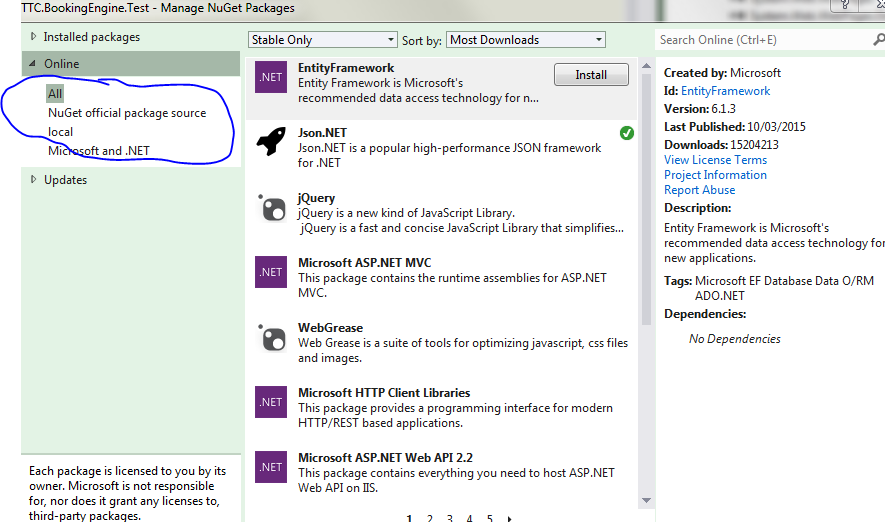
To be able to use Nuget repo again and be able to install typical libriaries like NUnit one has to add NuGet.Config to a folder that holds the solution file.
<?xml version="1.0" encoding="utf-8"?>
<configuration>
  <packageSources>
    <add key="NuGet official package source" value="https://nuget.org/api/v2/" />
    <add key="local" value="C:\development\PathToYourLocalNugetRepositoryIfYouNeedIt\NugetLocal" />
  </packageSources>
</configuration>

After modification, Manage NuGet Packages tool should show All, NuGet official package source, local, Microsoft and .NET.

Saturday, January 2, 2016

gulp-jshint@2.0.0 requires a peer of jshint@2.x but none was installed

Just like in title. When you try to run
npm install
In freshly created mean folder
cd  && npm install
You will probably first see

├── UNMET PEER DEPENDENCY jshint@2.x
Error and then at the very end
npm WARN EPEERINVALID gulp-jshint@2.0.0 requires a peer of jshint@2.x but none was installed.
In order to fix this issue you need to run
npm install --save-dev jshint gulp-jshint
It will show some invalid operations in a console

But at the end it will work.

Monday, December 14, 2015

node-gyp installation cl.exe missing


A common problem when you try to install karma, mean stack or other node modules that depend on gyp module. You see following message:
TRACKER : error TRK0005: Failed to locate: "CL.exe". The system cannot find the file specified. [d:\worek\gitHub\meanPlayground\play
ground\node_modules\bufferutil\build\bufferutil.vcxproj]
In many places you will see that you are missing VS2013 compiler, and you will be asked to install Microsoft Visual Studio Express 2012 for Windows Desktop. Do not do it if you are running VS2015, just add feature in VS: Common Tools For Visual C++ 2015.

Under the hood it will still install multiple 2013 components - ech, and the year is almost 2016.

Monday, October 26, 2015

InteliJ is a joke part1


I already can see that there will be part2 and followups. I totally do not understand how as popular language as Java lacks a good and modern IDE. I started to write a code in Java 8.

I created a new project and I had to manually point IDEA to a location of my Java SDK - guys how silly is that. Why not figuring out at least the default Java location from PATH, or check JAVA_HOME variable. How about making programmers life easier!

But I still was not able to write using Java 8! First I had to deal with lambda expressions not supported at this language level error. But that wasn't it, then I was greeted with javactask source release 8 requires target release 1.8 problem. Somehow IDEA thought that I was going to code using Java in version 1.5. I can't believe it, I don't have any other version then 1.8 installed on my machine and it is 21 century; why would I want to code by default in Java 1.5?

I will just add that I am using the newest IDEA IDE; current version is 14.1.

Documentation for Maven archetypes

I don't start new projects in Java often. Each time I do it I have to go thru terribly written Maven documentation. 10 maybe 13 years ago when I was writing my first projects with Maven documentation was terrible and absolutely nothing has changed. If I didn't know what I am looking for I would be terribly lost. Even when I know what I want it takes me huge amount of time to figure out how it is labeled in Maven project. Have a look at a difference between Simple and Quickstart project archetypes.
  1. Simple: An archetype to generate a simple Maven project.
  2. Quickstart: An archetype to generate a sample Maven project.

Wow, now I learned something definitely. Guys, what is the difference between simple and sample. Which archetype should be used just to create a playground application to write some code and unit test it. I mean library project type. I just want to run tests on my code to check something.
What a wonderful explanation we get when we dig into a given archetype. When you click on Simple project you see this. What is it - empty page. Maybe some explanation of what do I see here. Not to mention that I would expect to see a in depth explanation of when should I use it and why should I use this one.
I am speeches, how can you have something like that. The sad part is that Maven is not the only project in Jave world that is terrible in documentation.
To answer my question about which archetype to use. I recommend using quickstart, that will create a following project structure.
project
|-- pom.xml
`-- src
    |-- main
    |   `-- java
    |       `-- App.java
    `-- test
        `-- java
            `-- AppTest.java